How you reset your Gigasheet password depends on how you signed up. If you created an account with an email and password, you reset it from the login page. If you signed in with Google or Microsoft, Gigasheet never stored a password for you, so the reset happens with that provider instead.
Reset a password for an email and password account
- Log out of Gigasheet.
- Go to the login page.
- Click Reset password, under the password field.
- Enter your email and follow the instructions in the reset email.
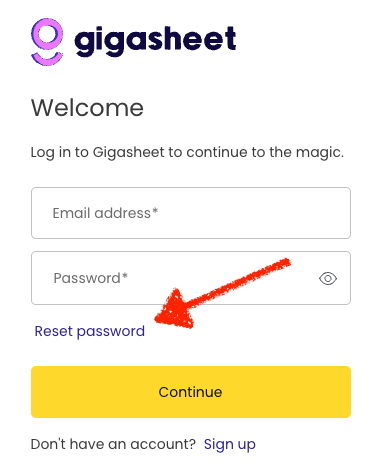
If the email doesn't arrive within a few minutes, check your spam folder and confirm you entered the address you signed up with.
Signed in with Google or Microsoft?
Many people forget they used their Google or Microsoft account to sign up. In that case there is no Gigasheet password to reset. Your login is managed by Google or Microsoft, so change your password there and keep using the Continue with Google or Continue with Microsoft button.
Not sure which you used? Try Reset password. If no email arrives, you most likely signed up with Google or Microsoft.
Switching login methods
Accounts can't be moved between Google or Microsoft login and email and password login. If you need to change how you sign in, submit a ticket and we'll help.
Still having trouble?
Email support@gigasheet.com from the address on your account.
Was this article helpful?
That’s Great!
Thank you for your feedback
Sorry! We couldn't be helpful
Thank you for your feedback
Feedback sent
We appreciate your effort and will try to fix the article