You can export any filtered view of Gigasheet's price transparency data to CSV, up to 1 million rows per export.
Export from a sheet
- Filter to the rates you need (e.g., one state, payer, and billing code).
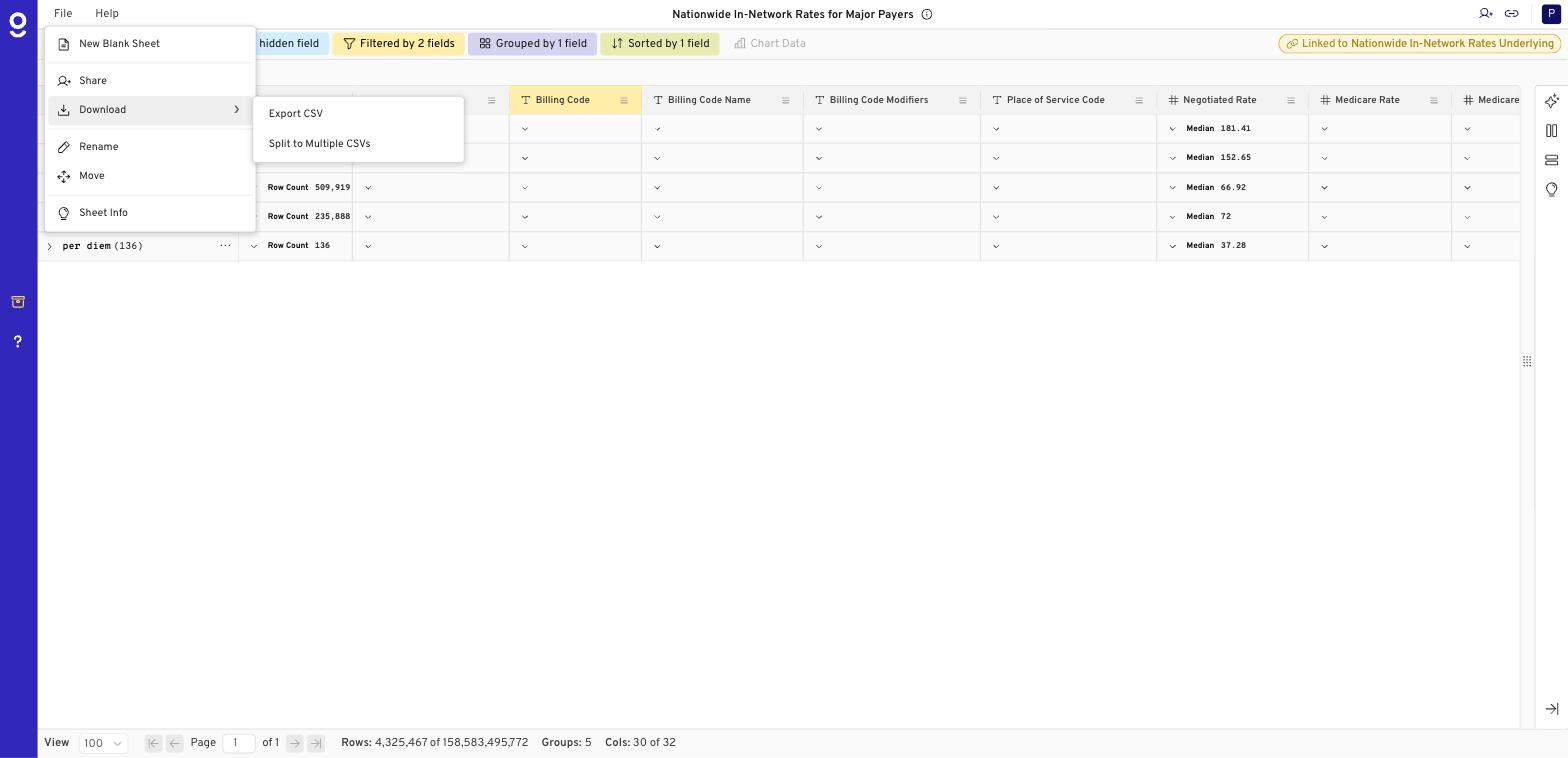
- Click File > Download > Export CSV.
- Gigasheet builds the export in the background.
When it's ready
- Small exports download right away.
- If an export takes more than about a minute, you'll get an email and an in-app notification when it's ready.
- All exports are saved in the Exports folder in your Library.
Export from the Price Transparency Explorer
The rate table's Export button downloads the visible provider summary as CSV. Benchmark View results also export to CSV.
Need more than 1 million rows?
- Split the export by state or payer and run several.
- Try File > Download > Split to Multiple CSVs for large result sets.
- Use the Gigasheet API to page through larger result sets.
- For full national datasets, see Bulk price transparency data.
Related: How Do I Speed Up Queries on National Price Transparency Data? · How Do I Save and Share a Price Transparency Query in Gigasheet? · Price Transparency Explorer FAQ
Was this article helpful?
That’s Great!
Thank you for your feedback
Sorry! We couldn't be helpful
Thank you for your feedback
Feedback sent
We appreciate your effort and will try to fix the article